

Hubstaff has always been a great tool for agencies. It offers solid time tracking, activity monitoring, and basic productivity insights that help teams stay accountable. For many growing businesses, it does the job well.
But, as your SMB business grows, you might need more control, better reporting or more. This is why many SMBs now explore alternatives that offer enterprise-grade controls without the enterprise-level complexity or cost.
In this guide, you will find the best Hubstaff alternatives to try in 2026, especially if you want more visibility, smarter monitoring, and better control over how your team works—
8 Best Hubstaff Alternatives for SMBs
| Tool | Free Plan | Pricing Starts from |
| Apploe | ✅ Yes | ~$4.50 per user/month |
| ActivTrack | ✅ Yes | ~$11.25 per user/month |
| Insightful | ❌ No free plan (trial available) | ~$8 per user/month |
| Teramind | ❌ No free plan (trial available) | ~$14 per user/month |
| Quickbooks Time | ❌ No free plan (trial available) | ~$8 per user/month |
| Time Doctor | ❌ No free plan (trial available) | ~$5.9 per user/month |
| Harvest | ✅ Yes (limited) | ~$12 per user/month |
| Everhour | ✅ Yes (limited) | ~$8.50 per user/month |
1. Apploye
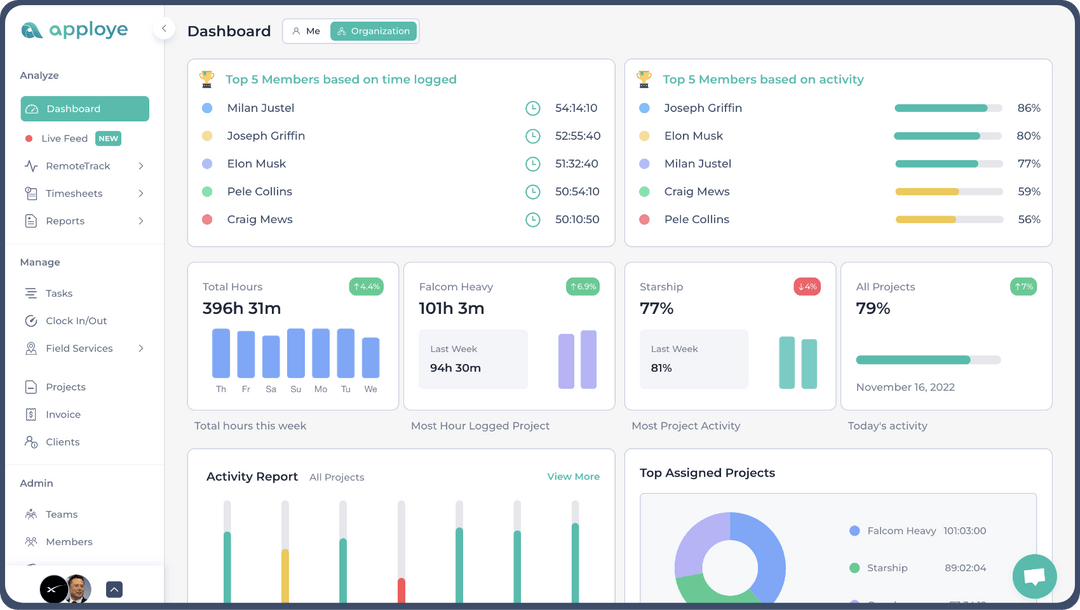
Apploye is a time tracking and on-site & remote employee monitoring software for businesses of all types.It has similar features to Hubstaff, like time tracking, payroll and invoicing, activity tracking, automated timesheets, etc. But Apploye offers these features at a lower cost than competitors like Hubstaff. Apploye also has the screen recording option, something Hubstaff still does not offer.
Apploye is best for Remote/hybrid teams, BPOs, marketing agencies, and SMBs who are looking for an affordable option compared to Hubstaff. Apploye also offer white label addon, so agencies can start their employee monitoring service business with their own branding.
Apploye is also GDPR & HIPAA compliant for data security.
How Apploye Works?
Rather than standing for heavy surveillance, Apploye works as a lightweight time tracking and employee activity monitoring tool. It focuses on clarity, balance and targets improving everyday productivity.
In Apploye, you start by creating your workspace and inviting your team. Employees then install Apploye on their devices or use the web and mobile apps, depending on how they work. Once set up, Apploye quietly runs in the background during work hours and collects only work related activity data. Depending on your needs, you can also use it as a stealth monitoring tool and collect data in quiet mode.
All tracked data flows into a central dashboard where you can see what is happening across your team in real time and through reports.
Apploye usually works in three stages–
-
- Activity and time capture: it’s where the tool captures users’ activity, records work, URL usage, counts idle times, takes screenshots, etc.
- Productivity insights and organization: the software analyzes the data and prepares productivity report for the managers to look into.
- Reporting, accountability, and optimization: Apploye turns daily activity into easy to read reports for managers, HR, and finance teams. You can review attendance, performance trends, and project costs from one place.
- Activity and time capture: it’s where the tool captures users’ activity, records work, URL usage, counts idle times, takes screenshots, etc.
Key features of Apploye
- Smart time tracking (projects + tasks): Track hours by project and task so reporting and billing match exactly where time went.
- Automated timesheets: Daily/weekly/monthly timesheets generated from tracked time, plus approval workflows for payroll-ready reporting.
- Optional screenshots (randomized): Elite supports up to 3 screenshots/10 minutes, and you can add More Screenshots to reach 60 screenshots/hour.
- Activity monitoring + apps/URLs: Visibility into user behavior and work patterns (useful for distributed teams and client-facing accountability).
- Screen recording (video): Paid add-on that captures screen recordings (stored as short segments) for deeper “proof of work” than screenshots alone.
- Stealth mode (optional): Paid add-on that runs silently on company-owned devices for teams that require hidden monitoring policies.
- Invoicing + payroll calculations: Create invoices from tracked time and calculate payroll from hourly rates and tracked hours (great for agencies and BPO payouts).
What sets Apploye as the best Hubstaff Alternative for SMBs?
- Similar Features but affordable: Apploye has similar employee time tracking & analytics features but it comes with a lower price tag.
- It is easy to start and easy to stick with: You can set up Apploye in minutes, invite your team, and start tracking the same day. For SMBs, this matters because time spent configuring tools is time lost running the business.
- Balanced monitoring without heavy surveillance: Apploye gives you visibility into time, productivity, and attendance without feeling intrusive. You track work activity on company time, not personal behavior. This helps SMBs maintain trust while still staying accountable.
- Built for cost control and growing teams: Project tracking, budgets, and reports help you see where time and money go before costs get out of hand. This is especially useful when your team is growing and every hour counts.
- One tool instead of many: For SMBs, Apploye often replaces multiple tools. You get time tracking, productivity insights, attendance, project reporting, and payroll ready data in one place. That keeps things simple and affordable.
- Clear reports that help you act: The reports are easy to understand, even if you are not a data person. You can quickly see who is overloaded, where work slows down, and what needs attention without digging through complex dashboards.
What Users Say About Apploye?
- I like that Apploye is simple with screen captures, making it easy to monitor remote developers. There isn’t too much complexity in how to review, which I find helpful. I also appreciate the sleek web format of Apploye, and it was easy to migrate from Hubstaff– Richard Q.
- An in-app live chat option for support would make getting quick answers even more convenient– Verified user
- I like using Apploye for time management and screenshot reports. It’s been a good experience and gives me good results. Managing a remote worker and tracking time was easy, which helped increase productivity a lot. It’s very easy to set up too– Blagoj B.
2. ActivTrack
ActivTrack is about seeing behavior as much as time. If your business cares about trends like when productivity dips or how workloads are distributed, this tool gives you a clearer lens. It’s less about punishment and more about understanding performance.
Key Features of ActivTrack
- Smart Time Tracking: It doesn’t just track hours; it categorizes them by project and task so you know exactly where your team’s energy is going.
- Optional Screenshots: You can set it to take random screenshots (up to 60 per hour) to ensure remote teams are staying on task.
- Field Force GPS: If you have employees on the move, Apploye can track their locations and time spent at specific job sites.
- Invoicing & Payroll: It skips the extra steps by letting you generate invoices and calculate pay based on tracked hours directly in the app.
What Users Say About ActivTrack
- Recent weather events gave us a great opportunity to demonstrate that our team can work remotely while staying fully productive and efficient. Operations continued without disruption, communication remained strong, and service levels were maintained. This showed that remote work is a reliable option when needed and that the team adapts well to changing conditions. (Kelly DH)
- What I don’t like much about ActivTrak is that sometimes it can feel a bit too detailed or overwhelming with all the data it collects. It can take time to sift through the reports to find what really matters. Also, some team members might feel a little uneasy knowing they’re being monitored, so it takes effort to balance using it for productivity without hurting trust. (Andres D)
3. Insightful
Insightful combines automatic tracking with smart analytics. It takes a bit of the guesswork out of team management by highlighting anomalies and productivity trends instead of raw logs alone. Great for hybrid or remote SMB teams.
Key Features of Insightful
- It uses AI to automatically assign time to specific projects based on the apps and sites your team is using.
- You can see exactly who is active, who is on a break, and what apps are currently being used across the company.
- It works as a digital punch clock, making it easy to manage attendance for hybrid teams.
- You can choose to have the software hidden for security roles or visible for collaborative teams.
What Users Say About Insightful
- Insightful provides me with a transparent, real-time overview of my team’s productivity, eliminating the need for constant follow-ups or micromanagement. The interface is straightforward and user-friendly, allowing me to quickly access activity summaries, track time spent on various tasks, and monitor how workloads are distributed. The dashboards are especially helpful for identifying performance trends and understanding where resources are being utilized most effectively. (Amro A)
- At times, Insightful can feel a bit too focused on monitoring rather than empowering, which may create concerns among employees if it isn’t implemented with transparency. Some features also produce very detailed activity data that can be overwhelming for managers to interpret without clear context. Additionally, setup and policy configuration can be complex for first-time users, requiring a bit of a learning curve before teams get full value from the platform. (Gisela L)
4. Teramind
Well, even in small or medium sized business, sometimes strict monitoring can be necessary. In that case, Teramind stands as a powerful Hubstaff alternative that relies on strict oversight and security.
It combines advanced activity monitoring with stealth monitoring to capture detailed user behavior across apps, files, and systems. Apart from employee monitoring, it equally focuses on preventing insider threats, Data loss prevention (DLP) and workforce productivity.
Key Features of Teramind
- Monitors behavioral data by tracking keystrokes, emails, and even file transfers to prevent data leaks.
- Allows to set automations like setting the system to automatically block an action (like uploading a file to a personal Drive) and notify you instantly
- Video records entire works and allows users to use the recording as they want to play back, replay, pause, etc.
- Allows to search for specific text that appeared on an employee’s screen, even if it was inside an image or a video
What Users Say About Teramind
- Teramind can be drilled right down to the second of what an employee is doing. You can watch live feed, recorded feed, set up analytics to compare quickly and many other things. The customer support has been wonderful and any issues are taken care of within 24 hours. I also have a weekly call with my representative that has made me much more comfortable in the environment and able to quickly get what I need and not take many hours. (Shannon P)
- Although Teramind is highly capable, the user interface can be difficult to navigate, especially for new administrators. There are many options, settings, and modules, which can make setup and day-to-day management more complex than necessary. Customizing reports and filtering data across a large number of endpoints can also be slow at times. Making the dashboard easier to use and improving overall performance would be a meaningful improvement. (Verified User)
- While the filter and column system was initially a bit challenging to understand, once you get the hang of it, creating custom reports tailored to your needs becomes incredibly easy. (Anna A)
5. QuickBooks Time
QuickBooks Time focuses on tracking accurate time log and employee invoices. It prepares reports based on work hours, locations, and shifts to help remote and field teams track workflows accurately. This tool is great for SMBs that already use QuickBooks or have field teams that clock in and out from different locations. It’s simple but powerful, especially with payroll and accounting integration built in.
Key Features of QuickBooks Time
- Allows to set ‘fence’ around a job site and automatically reminds employees to clock in when they arrive and clock out when they leave.
- Managers can build schedules and push them out to the team’s phones instantly.
- Prepares accurate payrolls integrating with Intuit.
- Syncs automatically for Quickbooks users.
What Users Say About QuickBooks Time
- What I like best about QuickBooks Time is how user-friendly it is. It makes tracking hours simple and quick, especially with the mobile app. I also like how easy it is to see time entries in real time, which helps with accuracy and keeps everything organized without feeling complicated. (Becca G)
- I don’t like that QuickBooks Time does not automatically tally up the hours from a specific pay period, so we had to enter the daily amount of hours into a program when payroll hit and then add it up to actually pay the employees. (Rolies K)
6. Time Doctor
Time Doctor accountability focused monitoring tool is designed for remote agencies that need to show clients exactly what they are paying for. It keeps busy teams focused and minimizes time theft by providing analytics in work time. It also starts automatically tracking user activity in order to enhance accountability.
Key Features of Time Doctor
- Sends pop-up alerts to employees reminding if they are still working if they spend too much time on different sites like YouTube or Facebook.
- Allows to provides clients with access for specific reports.
- Helps to see who is working late nights or weekends so managers can redistribute the workload fairly.
- Tracks and syncs user activity even if they work offline.
What Users Say About Time Doctor
- I like how Time Doctor makes it easier for managers to track and check each agent’s productivity. I appreciate the Screencast feature because it captures every minute, eliminating the need for managers to worry about and guess what the agents are doing. The setup was super easy, which was a relief after switching from manual tracking with Google Sheets. (Alliana O)
- One downside of Time Doctor is that some features, like screenshots and activity tracking, can feel a bit intrusive to certain team members if they’re not used to time-tracking tools. There are also moments when the app may record idle time or activity a little inconsistently, which requires occasional manual review. (patricia z)
7. Harvest
Apart from the other Hubstaff alternatives, Harvest approaches employee monitoring from a lighter angle. It focuses more on employee trust and visibility into data. As a profound employee monitoring software for SMBs, it emphasizes on project tracking and time reporting rather than deep surveillance. It also keeps activity tracking minimal which works well for teams that want insights into project health.
Key Features of Harvest
- Helps make better business plan using the given reporting on profit and utilization.
- Shows ‘burn-bar’ for each project to let managers track if they are exceeding budgets.
- Allows to take photos of invoices and tie them to individual projects for clients.
- Offers integrations with project management tools like Asana, Trello, and Slack.
What Users Say About Harvest
- As a user of Harvest’s features and resources, I can say that it is advanced and productive software that facilitates the management of my time and work projects, allowing real-time visualization of all my work processes.
- I can also say that Harvest stands out for its report generation features, allowing me to maintain an organized and professional workspace (Cindy F)
- Harvest’s lack of automatic time tracking requires manual starts/stops. (Sahil S)
- I like using Harvest’s virtual features and tools to boost my processes and workflows in a professional and advanced way, managing my time intelligently and productively.
I can also highlight the digital integration features that Harvest offers, boosting your applications and work systems and facilitating the execution of all your business activities (Yves G)
8. Everhour
Everhour is one of the best Hubstaff alternatives that integrates directly into project workflows. It blends project tracking with simple activity monitoring so teams can track work without switching tools. Though it offers reserved stealth monitoring opportunities, Everhour stands out for its visibility into tasks, budgets, and progress.
Key Features of Everhour
- Allows to track time directly from the project management software without switching tabs.
- Shows team capacity visually, so managers don’t accidentally give someone more work than they can handle.
- Handles fixed-fee or hourly projects with ease, allowing for complex billing cycles.
- Helps to create customized report to show clients how budget was spent down to the minute.
What Users Say About Everhour
- Everhour provides the ability to track billable hours on multiple project simultaneously. (Varified user)
- With everhour you need to stay on the page of the project your working on or make sure you remember to stop the timer if your doing something else. This can be problematic, sometimes you might be doing something like using a CRM that is updating plugins or something for the job, but it wont track that time on that page. So you need to make sure your time is correct in the end. Toggle Track is a another tool and seems to do the page swapping better and keep tracking the time. (Timothy B.)
Conclusion
Hubstaff is an ideal employee monitoring tool for teams of various sizes, but it does come with its own limitations. For some SMBs, it can feel restrictive, expensive as teams grow, or too focused on rigid monitoring.
On the other hand, the alternative tools we discussed do not follow a one-size-fits-all approach. Each offers a different balance of activity monitoring, stealth monitoring, project tracking, and reporting. Some focus on simplicity, others on deeper controls or privacy-friendly monitoring.
The best choice depends on what you actually need. When you match the tool with your team size, workflow, and goals, employee monitoring becomes supportive instead of stressful.
Frequently Asked Questions (FAQs)
1. Which Hubstaff alternative is best for remote teams?
Tools like Apploye, Time Doctor, and Insightful work especially well for remote teams because they offer clear productivity insights without constant supervision.
2. Which tool is best for SMBs that handle sensitive data?
Teramind is a strong choice if security, compliance, and insider threat detection are major concerns for your business.
3. Can I start with a free plan before upgrading?
Yes, several tools like Apploye, Harvest, and Everhour offer free plans or trials so you can test the software before committing.
4. Do Hubstaff alternatives support payroll and invoicing?
Many of them do. Apploye, Harvest, Everhour, and QuickBooks Time allow you to convert tracked hours directly into payroll or client invoice.
Guest writer